Best Vertical Mice for Remote Work in 2026: By Hand Size, Features & Value
A research-led guide to choosing a vertical mouse based on hand size, grip, connectivity, controls, battery life, usability and value.
Choose a vertical mouse by fit first, then features and price.
The best vertical mouse depends heavily on your hand size, grip, connectivity requirements and budget. The Logitech Lift is a strong starting point for many small-to-medium hands; the Logitech MX Vertical is better suited to larger hands; and the Perixx PERIMICE-513 is particularly relevant to left-handed users. Budget models from Anker, TECKNET and LEKVEY can be useful if you want to experiment before spending more.
A vertical mouse is not automatically more comfortable for everyone. Hand size, grip style, desk setup and the amount of mouse movement required all affect the result.
Why Consider a Vertical Mouse?
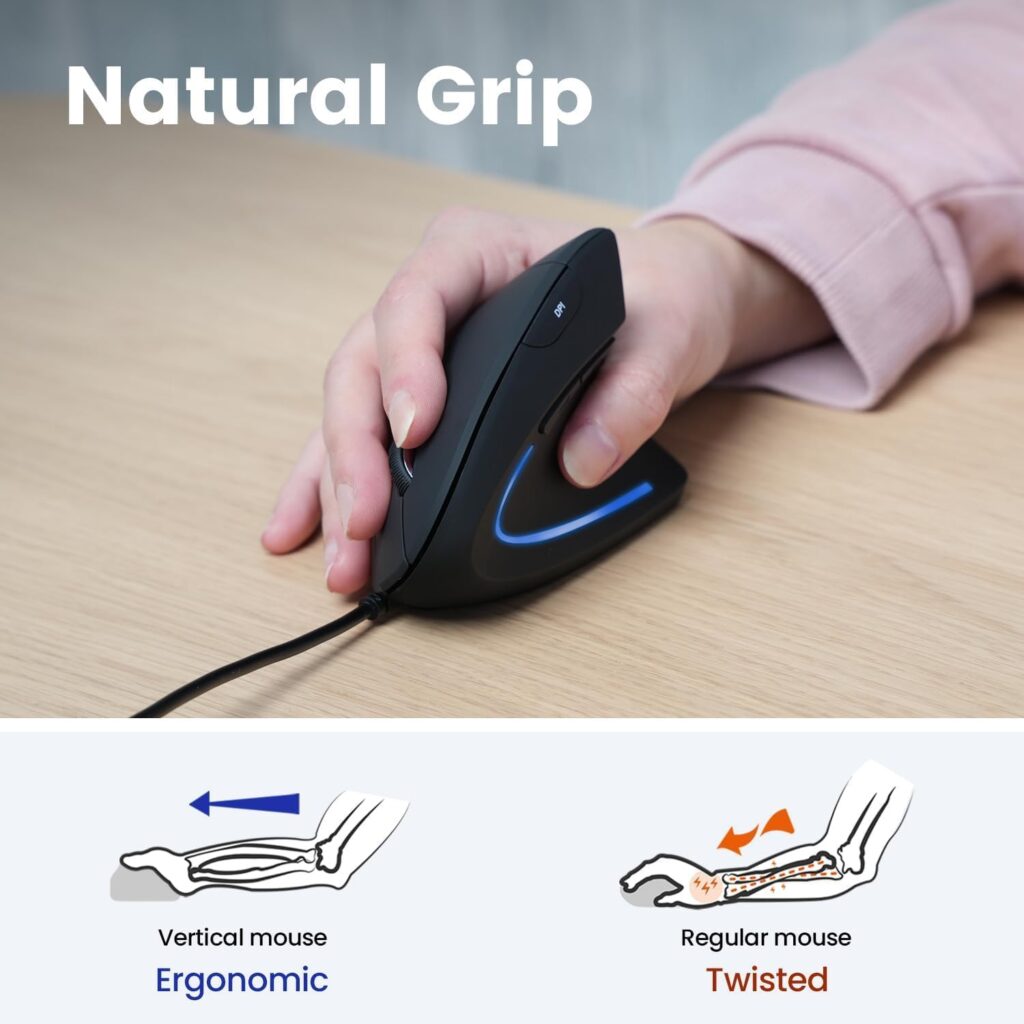
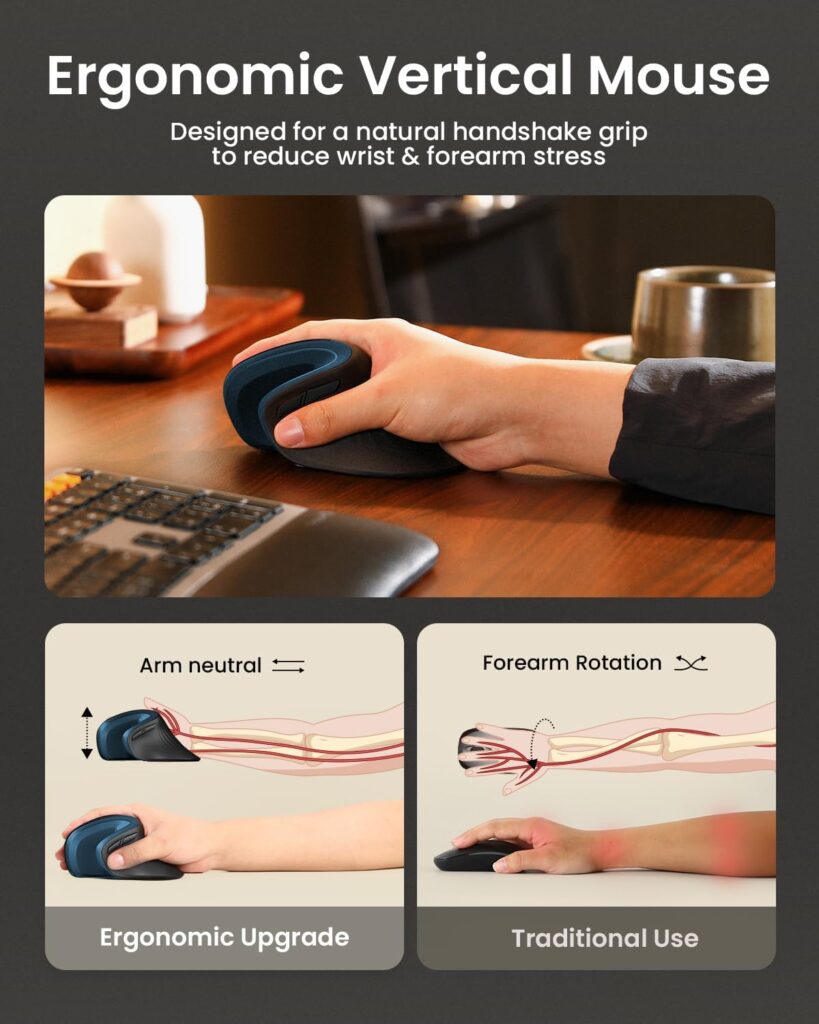
Traditional mice generally place the hand in a palm-down position. Vertical mice rotate the hand so that it is closer to a neutral or “handshake” orientation. The goal is to reduce the amount of forearm rotation required to operate the mouse.
That design may be more comfortable for some people, particularly those who find conventional mouse shapes uncomfortable during long periods of use. However, ergonomics are highly individual. A vertical mouse can feel excellent to one person and awkward to another.
Fit matters more than marketing claims.
Does a Vertical Mouse Actually Reduce Wrist Pain?
This question deserves a careful answer. A vertical design changes the position of the hand and forearm, which can reduce pronation compared with some traditional mouse designs. But that does not mean a vertical mouse will prevent or cure wrist injuries.
Comfort depends on several factors:
- Mouse size
- Grip style
- Desk height
- Arm support
- Keyboard position
- Frequency of breaks
- Amount of repetitive movement
- Individual anatomy
If you experience persistent pain, numbness or other symptoms, a mouse should not be treated as a medical solution. Consider discussing the problem with an appropriately qualified healthcare professional.
How to Measure Your Hand for a Vertical Mouse
Measure the distance from the base of your palm to the tip of your middle finger. Use this as a starting point, not an absolute standard.
| Hand length | Approximate category |
|---|---|
| Under 15 cm | Small |
| 15–17 cm | Medium |
| Over 17 cm | Large |
These are not universal industry standards. Manufacturers can use different sizing systems, so always check the specific product’s sizing recommendations before buying.
Logitech Lift Vertical Ergonomic Mouse
Best for: Small to Medium Hands
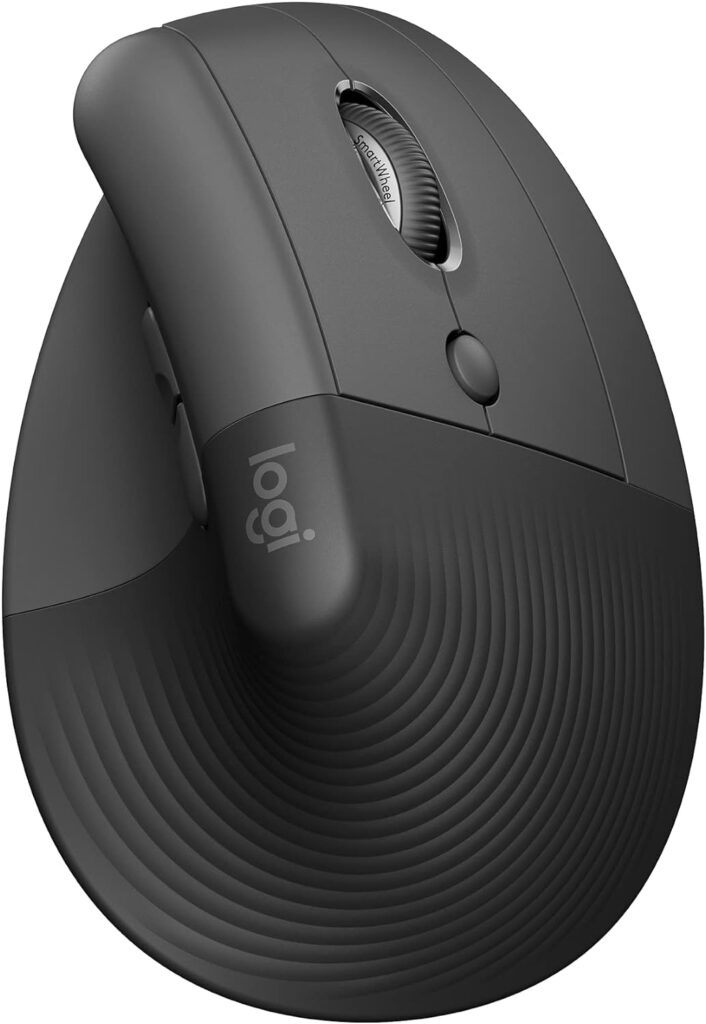
The Logitech Lift is one of the most accessible starting points for people interested in vertical mice. Its 57-degree orientation is less extreme than some highly vertical designs, which may make the transition easier for people who have never used this type of mouse.
Key features
- 57-degree vertical orientation
- Designed for smaller hands
- Wireless connectivity
- Adjustable pointer sensitivity
- Programmable buttons
- Manufacturer-rated long battery life
- Logitech Options+ software support
Why consider it?
The Lift’s relatively compact body is its biggest advantage. Large vertical mice can feel difficult to control if your hand doesn’t comfortably cover the body.
The Lift therefore makes more sense for users who find conventional large ergonomic mice cumbersome.
Potential drawbacks
- May feel too small for large hands
- Not designed primarily for gaming
- Vertical design requires some adjustment
- Features vary slightly between versions
Logitech MX Vertical
Best for: Large Hands

The MX Vertical is one of Logitech’s better-known ergonomic vertical designs. Its larger body makes it more suitable for people who find compact vertical mice uncomfortable.
Key features
- 57-degree vertical design
- 4,000 DPI sensor
- USB-C rechargeable battery
- Bluetooth and wireless receiver connectivity
- Multi-device support
- Logitech Flow support
Why consider it?
The larger body gives the palm more room and can make the mouse easier to control for larger-handed users.
The ability to switch between multiple computers is particularly useful for remote workers who regularly use more than one device.
Potential drawbacks
- Larger and heavier than the Logitech Lift
- Premium pricing
- Can take time to adjust to
- May be uncomfortable for smaller hands
Perixx PERIMICE-513
Best for: Left-Handed Users
Left-handed users have fewer ergonomic mouse choices than right-handed users. The PERIMICE-513 stands out because Perixx offers versions designed for different hand orientations and sizes.
Key features
- Vertical ergonomic design
- Left- and right-handed versions
- Multiple buttons
- Wired connection
- Different size options
Why consider it?
The availability of a left-handed configuration makes this mouse particularly relevant to users who are poorly served by mainstream ergonomic mice.
The wired design also eliminates battery management.
Potential drawbacks
- Cable limits mobility
- Heavier than some wireless alternatives
- Design is less premium than some Logitech models
HP 925 Ergonomic Vertical Mouse
Best for: Feature-Rich Windows Workstations
The HP 925 is a premium ergonomic mouse designed around a more vertical hand position. It supports multiple connection methods, making it attractive for people who work across several computers.
Key features
- Bluetooth connectivity
- 2.4GHz wireless connection
- Multi-device support
- Programmable controls
- Rechargeable battery
- Vertical ergonomic design
Why consider it?
The combination of wireless connectivity and multi-device support makes the HP 925 particularly interesting for modern workstations.
Potential drawbacks
- Relatively large design
- May not suit smaller hands
- Premium pricing
- Ergonomic benefits vary between users
Evoluent VerticalMouse 4
Best for: Users Who Want an Established Ergonomic Design
Evoluent has been associated with vertical ergonomic mice for many years. The VerticalMouse family uses a highly upright orientation intended to reduce the amount of forearm rotation compared with conventional mice.
Why consider it?
The design is particularly interesting for people who specifically want a more pronounced vertical orientation.
The availability of different hand orientations is another advantage.
Potential drawbacks
- Large body
- Premium pricing
- More significant learning curve
- May not suit small hands
Anker 2.4G Wireless Vertical Mouse
Best for: Budget Buyers
Anker’s vertical mouse has historically been popular because it provides an inexpensive way to experiment with the vertical mouse concept.
Why consider it?
You don’t necessarily need to spend a large amount of money to discover whether you like a vertical mouse.
A budget model can be a sensible first experiment.
Potential drawbacks
- Basic feature set
- USB receiver rather than Bluetooth on some versions
- Less sophisticated software support
- Build quality may not match premium models
TECKNET Ergonomic Vertical Mouse
Best for: Value
TECKNET offers several affordable ergonomic mice, including vertical designs. The appeal is the balance between price and functionality.
Key features
- Multiple DPI settings
- Wireless connectivity
- Programmable controls
- Multi-device support on selected models
- Ergonomic vertical shape
Why consider it?
Because TECKNET sells multiple versions, check the exact model before purchasing.
LEKVEY Vertical Mouse
Best for: Affordable Rechargeable Design
LEKVEY is another budget-oriented option for people interested in the vertical mouse shape. Its rechargeable designs can be attractive if you don’t want to replace disposable batteries.
Why consider it?
Affordable
Rechargeable
Vertical design
Suitable for people experimenting with ergonomic mice
Potential drawbacks
- Software support may be limited
- Build quality varies
- Battery performance depends on model and usage
ProtoArc EM11 NL
Best for: Small Hands
The ProtoArc EM11 NL is designed around a more compact vertical form. That makes it worth investigating if larger ergonomic mice feel oversized.
Why consider it?
Compact shape
Designed for smaller hands
Rechargeable
Affordable compared with some premium alternatives
Potential drawbacks
- Less suitable for large hands
- Feature set varies by configuration
- Battery performance should be checked against the current model
Which Vertical Mouse Is Best for Your Hand Size?
Small hands
Start with: Logitech Lift or ProtoArc EM11 NL.
A compact body is generally easier to control when your hand cannot comfortably reach around a larger vertical mouse.
Medium hands
Consider: Logitech Lift, TECKNET or Perixx PERIMICE-513.
Medium-handed users have the widest range of options.
Large hands
Consider: Logitech MX Vertical, HP 925 or Evoluent VerticalMouse.
Pay particular attention to palm support and overall mouse height.
Left-handed users
Look at: Perixx PERIMICE-513 or Evoluent VerticalMouse models.
Always verify exact handedness because availability varies by model.
Vertical Mouse vs. Traditional Mouse
| Feature | Vertical Mouse | Traditional Mouse |
|---|---|---|
| Hand position | More upright | Palm-down |
| Learning curve | Usually higher | Usually minimal |
| Gaming | Usually less suitable | Wide range of options |
| Ergonomic focus | Primary design goal | Varies |
| Small/large-hand options | Varies | Extensive |
| Productivity | Excellent for many users | Excellent |
| Comfort | Highly individual | Highly individual |
The important point is that vertical doesn’t automatically mean better. If a traditional mouse fits your hand well and causes no discomfort, there may be no reason to switch.
How Long Does It Take to Get Used to a Vertical Mouse?
There isn’t a universal adjustment period. Some users adapt quickly; others may need several days or longer. The biggest changes are usually cursor control, hand positioning, scrolling, button location and movement technique. A moderate-angle mouse such as the Logitech Lift may feel easier to transition to than a highly vertical design.
Are Vertical Mice Good for Gaming?
Generally, they’re better suited to productivity than competitive gaming. Conventional gaming mice typically provide lighter weight, faster movement, gaming-oriented sensors, higher polling rates and familiar grip shapes.
A practical solution is to keep a vertical mouse for work and a conventional gaming mouse for gaming if you need both.
Do Vertical Mice Prevent Carpal Tunnel Syndrome?
No mouse should be marketed as a guaranteed way to prevent or treat carpal tunnel syndrome. A vertical design changes wrist and forearm positioning, but ergonomic problems are influenced by much more than the mouse.
Your overall workstation matters: desk height, chair position, keyboard placement, monitor height, arm support, posture, break frequency and repetitive workload.
If you’re experiencing persistent pain, numbness or weakness, seek professional medical advice rather than relying on a mouse as treatment.
Are Vertical Mice Worth It?
For the right user, yes. They can be particularly worthwhile if you dislike palm-down mouse positions, work at a computer for long periods, prefer an upright grip, find conventional mice uncomfortable or want to experiment with a different ergonomic setup.
But don’t buy one simply because a product description says “ergonomic.” Fit matters more than the label.
Start with the mouse that fits your hand.
Best Overall: Logitech Lift — a strong starting point for small-to-medium hands and people new to vertical mice.
Best for Large Hands: Logitech MX Vertical — a larger ergonomic design with more palm space.
Best Left-Handed Option: Perixx PERIMICE-513 — one of the more useful choices for left-handed users.
Best Budget Starting Point: Anker Vertical Mouse — a lower-cost way to test whether the vertical concept works for you.
Best for Small Hands: ProtoArc EM11 NL — worth investigating if conventional vertical mice feel too large.
Final Verdict
There isn’t one vertical mouse that is best for everyone. The right choice depends primarily on hand size + grip + mouse shape + connectivity + workload + budget.
For most small-to-medium-handed users, the Logitech Lift is an excellent place to start. For larger hands, the Logitech MX Vertical deserves serious consideration. Left-handed users should look closely at the Perixx and Evoluent options because availability of left-handed ergonomic mice remains more limited.
If you’re unsure whether a vertical mouse is right for you, starting with an inexpensive model can be a sensible way to experiment before spending more. A comfortable mouse is only one part of a healthy workstation.
LaptopSage may earn a commission when readers purchase products through qualifying links. This does not increase the price you pay and does not determine our editorial conclusions. Our recommendations are based on product features, evidence, usability and value rather than the size of a potential commission.

I’m Emmanuel Joatham, a remote work product researcher with 6+ years of experience testing laptops and accessories from my home office.